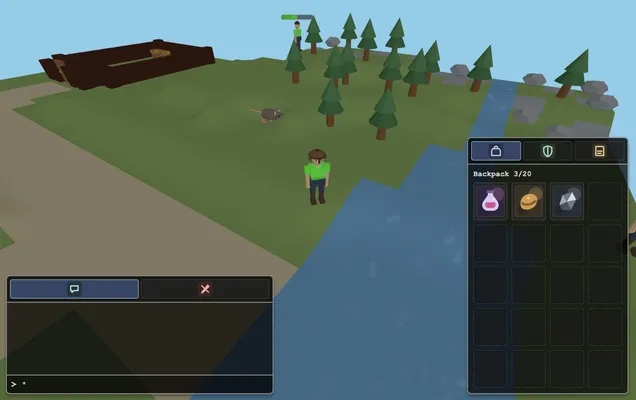
Welcome to Webscape!
Webscape is a low tick rate, tile-based browser MMO highly inspired by Runescape.
The game is currently in active development. You can access and play it here: https://webscape.dazkins.com/
The Go server is authoritative, and the playable client communicates with it through /ws. Gameplay traffic follows three deliberately separate patterns:
| Flow | Purpose | Examples | Delivery semantics |
|---|---|---|---|
| Client → server commands | Express player intent for the server to validate and execute | move, chat, interact, equip |
A request, never authoritative state or proof that an outcome occurred |
| Server → client state | Replicate the current authoritative truth | world, chunkUpdate, gameUpdate component deltas |
Per-client and interest-filtered; reconnect and interest re-entry reconstruct current state |
| Server → client events | Notify eligible clients that something happened once | chatMessage, combatResolved |
Stateless and not replayed; the client owns presentation and expiry |
Commands use { "type": ..., "data": ... }. Server messages use { "metadata": { "type": ..., "time": ... }, "data": ... }.
On each 500 ms game tick, the server runs its ECS systems and then synchronizes every client's visible chunks and entities. gameUpdate contains only changed serializable components; a null component value removes it. If a fact must survive reconnect or interest re-entry—position, health, inventory, quest progress, whether a door is open—it belongs in replicated state.
One-shot occurrences use the server's typed domain-event dispatcher instead. Registered subscribers can independently advance quests or project a safe event DTO to interested clients. Client events are sent after that tick's state deltas, so rendering reacts to the latest authoritative state. Chat bubbles, hit splats, and transient combat animations are client-owned effects. Ongoing fishing and woodcutting animations are selected from their replicated phase and phase-start tick.
Internal domain events and WebSocket messages are intentionally different contracts: the server explicitly chooses recipients and maps approved fields into a wire DTO. Events are not replayed after a disconnect. Specialized conversation and questCompleted notifications are also non-state messages, although they currently use their own targeted flows. Session-control responses such as registered and registrationFailed handle connection setup rather than gameplay state.
Build the playable client before starting the server:
cd client
pnpm install --frozen-lockfile
pnpm run build
cd ..
go run .
The editor runs separately from editor/ with pnpm run dev.
The top-right build label identifies the loaded client assets by the first eight characters of their Git commit SHA. Hover over it for the full revision. The identifier is fixed when Vite starts or builds; rebuild and reload the client to pick up a different revision.
Local builds detect Git HEAD automatically, including in Git worktrees, and append
-dirty when the repository has uncommitted changes (including untracked files).
Set WEBSCAPE_BUILD_REVISION to an explicit commit SHA to override detection. An
explicit revision is used as supplied, without an automatic dirty suffix. Builds
without Git metadata or an override show Build unknown.
Docker excludes Git metadata, so pass the client source revision at build time:
docker build --build-arg WEBSCAPE_BUILD_REVISION="$(git rev-parse HEAD)" -t webscape .Build deployments from a clean checkout so that this SHA identifies their source. The label identifies the client build; it does not version a separately deployed server or game content.
The Publish Docker image GitHub Actions workflow builds the root Dockerfile on
pushes to master, including merged pull requests, and publishes a Linux AMD64
image to GitHub Container Registry:
ghcr.io/dazkins/webscape:latesttracks the latest successful publication.ghcr.io/dazkins/webscape:sha-<full-commit-sha>identifies a specific revision.
The workflow passes the source SHA into the client build identifier and image
metadata. It authenticates with the automatic GITHUB_TOKEN using
contents: read and packages: write; no additional registry secret is needed.
After successful publication, the workflow requests a Coolify deployment of the
new latest image. A failed build or publication never triggers deployment.
Pull and run a published image with:
docker pull ghcr.io/dazkins/webscape:latest
docker run --rm -p 8080:8080 ghcr.io/dazkins/webscape:latest
For a specific revision, replace latest with its sha-<full-commit-sha> tag.
Package visibility is managed in GitHub Packages settings; make the package public
if anonymous pulls are required, or authenticate to GHCR before pulling a private
package.
Configure the Coolify application to deploy the Docker image
ghcr.io/dazkins/webscape:latest. In Coolify, create an API token under
Keys & Tokens → API Tokens with the Deploy permission, and copy the
application's Webhook → Deploy webhook URL. See the
Coolify GitHub Actions guide.
Add these repository secrets under GitHub Settings → Secrets and variables → Actions:
COOLIFY_WEBHOOK: the application's HTTPS deploy webhook URL, reachable from GitHub-hosted runners.COOLIFY_TOKEN: the API token with Deploy permission.
The workflow sends an authenticated HTTPS POST to /api/v1/deploy, preserving
the application UUID and other query parameters from the copied webhook URL.
Only the master publication workflow calls this webhook, after the image push
succeeds. PR preview builds publish their separate prerelease images and never
request a Coolify deployment. Publication and the webhook request share the same
workflow concurrency group.
Missing secrets, network errors, and non-2xx responses fail the workflow's deployment step even though the image has already been published. The request has a 60-second timeout and is not automatically retried: a timeout can occur after Coolify has queued a deployment. Check Coolify before retrying. A successful request means Coolify accepted it; monitor the rollout in Coolify to confirm the game is running the expected revision. Keep tokens in GitHub secrets, never in source control.
Copyright © 2025–2026 David Atkins.
Webscape is free software licensed under the GNU Affero General Public
License version 3 only (AGPL-3.0-only). You may use, modify, and
distribute it under that license. It is provided without warranty.
If you run a modified version for users over a network, the AGPL requires you to offer those users the complete corresponding source code for that version. Update the in-game source link if your deployment's source is hosted somewhere other than this repository.
Third-party components retain their own licenses; see THIRD_PARTY_LICENSES.txt.
config.json sets server.tickIntervalMs to 500 for two authoritative ticks per second (also the default when omitted). The server advertises this interval in the world message for the client clock. Game action durations are expressed in ticks, so changing the interval changes gameplay speed.
The loop advances a monotonic deadline by one interval per completed tick. If work or scheduling delays leave ticks overdue, it executes full recovery ticks immediately and sequentially, retaining all accumulated debt. Each recovery tick synchronizes state before flushing events. Shutdown is checked between steps. Sustained CPU overload cannot be cured by catch-up alone; the backlog remains visible rather than silently skipping simulation time.
Logs use these searchable event names:
tick_loop_started: configured interval and target ticks per second.tick_overrun: every update exceeding the interval, with tick number, total duration, start lateness, game-lock wait, systems, synchronization, events, and the slowest system.tick_recovery_started: overdue time and number of pending ticks, including delays caused by host scheduling.tick_recovery_progress: backlog and recovery count every five seconds during sustained recovery.tick_recovery_finished: recovery tick count and elapsed recovery time.
Pathfinding uses one A* search to reach any valid tile within interaction range, then validates and follows cached steps. Tile blocker counts track doors and entity footprints. Each search is limited to 16,384 expanded nodes; routes exceeding this work limit are rejected rather than allowing an unbounded search to stall a tick.
Persistence is independent of server.devMode. The checked-in config.json uses
"persistence": {"driver": "none"}, which keeps development sessions ephemeral.
For restart/reconnect testing, use PostgreSQL, the same backend as deployment.
There is no embedded SQLite database.
Deploy PostgreSQL separately and set these options in your mounted config.json:
"persistence": {
  "driver": "postgres",
  "worldKey": "webscape-production",
  "timeoutSeconds": 10,
  "postgres": {
    "connectionStringEnv": "WEBSCAPE_DATABASE_URL"
  }
}
Set WEBSCAPE_DATABASE_URL in the game container's environment to a PostgreSQL
connection URL, for example
postgres://webscape:PASSWORD@postgres.example.net:5432/webscape?sslmode=verify-full.
Percent-encode special characters in URL credentials. The value is read at startup;
a missing/empty variable fails startup. Connection strings and passwords are never
logged. PostgreSQL's keyword connection-string syntax is also supported.
Alternatively, configure individual fields:
"persistence": {
  "driver": "postgres",
  "worldKey": "webscape-production",
  "timeoutSeconds": 10,
  "postgres": {
    "host": "postgres.example.net",
    "port": 5432,
    "database": "webscape",
    "user": "webscape",
    "passwordEnv": "WEBSCAPE_DATABASE_PASSWORD",
    "sslMode": "verify-full",
    "sslRootCert": "/certs/postgres-ca.pem"
  }
}
port defaults to 5432, sslMode to verify-full, worldKey to default, and
timeoutSeconds to 10. sslRootCert is optional when the issuing CA is already
trusted. Optional sslCert and sslKey support client certificates; certificate
paths must be readable inside the game container. password supports an inline
password, but cannot be combined with passwordEnv. connectionStringEnv, when
set, overrides the individual connection fields, including TLS settings. Local
isolated database tests can explicitly use sslMode: "disable".
The database/user must already exist. On startup the adapter creates
webscape_worlds and webscape_components if needed, so the user needs schema
CREATE permission and SELECT/INSERT/UPDATE/DELETE permissions on those tables.
Use a direct PostgreSQL connection
or a session-pooling endpoint: a session advisory lock prevents two game servers
from writing the same worldKey. Transaction-pooling endpoints are unsupported.
Use different keys/databases for independent worlds and previews. A rolling
replacement must stop the old server before the new server acquires its key.
The game exposes storage-independent snapshot/restore methods. Each component's
component*_save.go owns its DTO, versioned decoder registration, Save method,
and invariant checks. Shared helpers dispatch through interfaces; restore orchestration
decodes and validates all entities before installing any. The read-only validation
context supplies authored registries and cross-entity item ownership checks without
importing Game into components. server/snapshot defines only the neutral envelope;
server/persistence owns PostgreSQL, schema migrations, delta calculation and atomic
writes. Game systems and command handlers have no database dependency. New components
provide their own save codec or explicitly mark themselves transient.
Each snapshot captures entity IDs, durable components (including server-only fields),
the simulation tick, and offline players. PostgreSQL stores world metadata in
webscape_worlds and one row per (world_key, entity_id, component_id) in
webscape_components, with versioned JSON payloads. The adapter compares against
its last successfully committed baseline and writes only added/changed components
and deletions. All row changes and world metadata commit in one transaction, so an
item transfer cannot be partially saved. Loads read a consistent transaction too.
Saves run after ticks, registered-player disconnects, and graceful shutdown.
Commands never directly trigger persistence: accepted changes are captured by the
next tick or disconnect, and rejected/unknown/unregistered traffic cannot amplify
checkpoint work. Viewer disconnects do not save. Database I/O happens outside the
game mutex; captures and writes are serialized to prevent older snapshots overwriting
newer ones. Startup/load/save failures stop the server without resetting progress or
switching to none. Abrupt termination restores the last committed checkpoint.
The smaller rows avoid rewriting unchanged component payloads and allow targeted inspection/migrations. The tradeoff is more rows/indexes, explicit deletion handling, and transactional assembly on load. Snapshot capture and comparison still scan the in-memory world; incremental dirty tracking is a separate future optimization.
Restored players stay outside the active ECS until they reconnect using their
existing browser player ID. Their name, appearance, items, equipment, health and
quest progress survive; no starter inventory is granted again. Clearing browser
storage loses that identifier. This ticket retains the existing identity mechanism;
account authentication and recovery are separate work. Movement, combat, fishing,
woodcutting, facing targets, conversations and trading sessions resume idle rather
than replaying old actions or events. Resource/spawn countdowns pause while the
server is stopped. Authored terrain and registries still load from game-project.
Snapshots and component payloads are versioned and validated before restoration.
A fingerprint of game.json and its referenced content files rejects restores
against changed authored content. Back up and explicitly migrate a saved world
when changing that content, or choose a new worldKey for a fresh world. The
existing save is never discarded automatically. PostgreSQL backups must include both
webscape_worlds and webscape_components in the same consistent backup.
SQL schema v2 automatically imports a v1 webscape_snapshots row for the selected
world key on first load. The import is transactional and preserves the entity and
component save formats. The original blob remains as a migration backup, marked v2
so an older binary refuses to load stale progress. Subsequent saves use the new tables;
the legacy blob is not a current backup. Existing v1 installations also need SELECT
and UPDATE permission on the legacy table during migration. Do not downgrade to the
old binary after migration.
Run the isolated storage integration tests with:
WEBSCAPE_TEST_DATABASE_URL='postgres://USER:PASSWORD@127.0.0.1:5432/TEST_DB?sslmode=disable' go test ./... -count=1Integration tests create unique world keys and remove their rows afterward. Use an
isolated test database: rollback tests also install and remove a temporary test trigger.
Without that variable, database integration tests are skipped; snapshot/restore,
configuration and coordinator tests still run under go test ./....