





dirplot creates nested treemap images for directory trees. It can display them in the system image viewer or inline in the terminal (iTerm2 and Kitty protocols, auto-detected). It also animates git history, watches live filesystems, and scans remote sources.
pip install dirplot
dirplot map .          # treemap of current directory, opens in system viewer
dirplot map . --inline # display inline in terminal (iTerm2 / Kitty / Ghostty)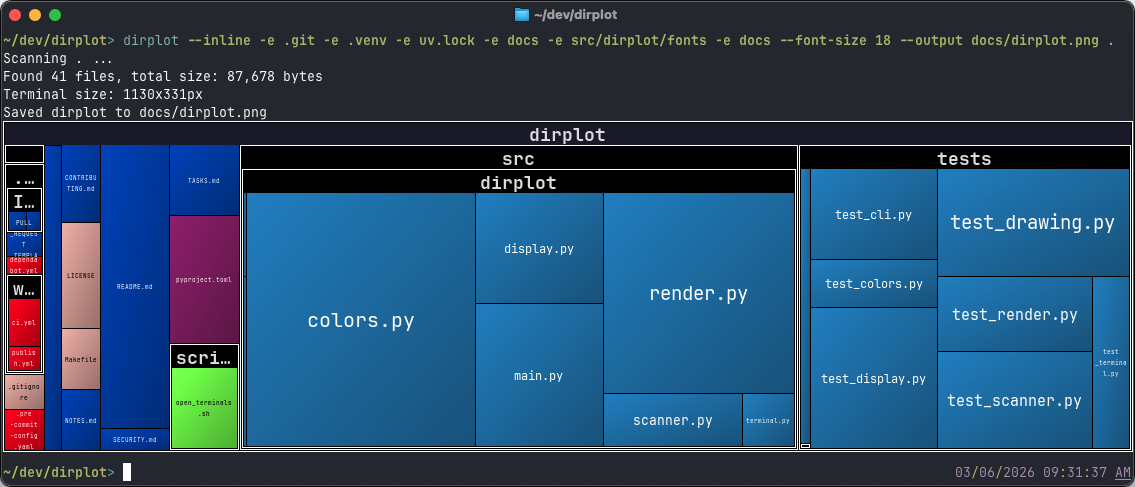
| I want to… | Go to |
|---|---|
| Scan a local directory or archive | Quick start |
| Scan a GitHub repo, S3 bucket, SSH host, or container | Remote access & examples |
| Scan Google Drive | Google Drive |
| Animate git history or watch live filesystems | Git History Animation |
| Use dirplot from Python | Python API |
| Run in Docker | Running via Docker |
| Fix an error | Troubleshooting |
| Method | Command | Notes |
|---|---|---|
| Installed CLI | dirplot map . |
After pip install / uv tool install |
| No install (uv) | uvx dirplot map . |
Runs the latest release ephemerally |
| Python API | from dirplot import build_tree, create_treemap |
See API.md |
| Docker | docker run --rm dirplot dirplot map … --output - |
See Docker |
- Squarified treemap layout; file area proportional to size; per-extension colours (GitHub Linguist palette for known types, configurable Matplotlib colormap for the rest).
- PNG, animated PNG (APNG), MP4, and MOV output for single frames and animations; interactive SVG for static maps; renders at terminal pixel size or a custom
WIDTHxHEIGHT. - Inline terminal display — renders directly into iTerm2, Kitty, Ghostty, WezTerm, and Warp without opening a separate window; protocol auto-detected.
- Animate git history (
dirplot git), Mercurial history (dirplot hg), and replay filesystem event logs (dirplot replay) — output APNG, MP4, or MOV. Watch live filesystems (dirplot watch) with optional snapshot and event logging. - Scan metrics (
dirplot metrics) — file/dir counts, total size, depth, top extensions by count or size, largest files and directories with percentage of total; JSON output supported. - Compare two trees (
dirplot diff) — treemap diff of any two sources (local dirs, GitHub repos, archives, S3, SSH, Docker, K8s, or two commits/tags);dirplot diff .shows uncommitted changes; files sized by B; colour-coded borders show added (green), removed (red), and changed (blue) files. Git/hg repos scan only tracked files; change detection uses blob hashes (LFS-aware). - Scan SSH hosts, AWS S3, GitHub repos (public and private), Docker containers, Kubernetes pods, and Google Drive — no extra deps beyond the respective CLI.
- Read archives directly (zip, tar, 7z, rar, jar, whl, …) without unpacking.
- Works on macOS, Linux, and Windows (WSL2 fully supported).
# Recommended: isolated tool install via uv (fastest)
uv tool install dirplot

# Alternative: pipx (install pipx first if needed: brew install pipx on macOS)
pipx install dirplot

# Into the current environment
pip install dirplot
Optional extras — install only what you need:
| Extra | Enables | Install |
|---|---|---|
ssh |
Scan remote servers via SSH (adds paramiko) | pip install "dirplot[ssh]" |
s3 |
Scan AWS S3 buckets (adds boto3) | pip install "dirplot[s3]" |
libarchive |
Additional archive formats: .tar.zst, .iso, .dmg, .rpm, .cab, … (requires system libarchive) |
pip install "dirplot[libarchive]" |
Other runtime requirements:
dirplot watch— watchdog is installed automatically.dirplot git— requiresgitonPATH.dirplot hg— requireshg(Mercurial) onPATH.- MP4 output (
dirplot git,dirplot hg,dirplot replay) — requires ffmpeg onPATH. dirplot read-metaon.mp4files — requiresffprobe(bundled with ffmpeg).
dirplot map .                                                    # current directory
dirplot map . --inline                                           # display in terminal (iTerm2/Kitty)
dirplot map . --output treemap.png --no-show                     # save to file
dirplot map . --log-scale 4 --inline                             # log scale (4× ratio), inline
dirplot map github://pallets/flask                               # GitHub repo
dirplot map gdrive://                                            # Google Drive root (requires gog)
dirplot map docker://my-container:/app                           # Docker container
dirplot map project.zip                                          # archive file
tree src/ | dirplot map                                          # pipe tree output

dirplot git . -o history.mp4 --animate                           # full git history
dirplot git . -o history.mp4 --animate --last 30d                # last 30 days
dirplot git github://owner/repo -o h.mp4 --animate --last 7d     # GitHub, last week

dirplot hg /path/to/repo -o history.png --animate                # full hg history
dirplot hg /path/to/repo@tip -o history.png                      # static, tip only

dirplot watch . --snapshot treemap.png                           # live watch, snapshot on each change
dirplot watch . --event-log events.jsonl                         # record events for replay
dirplot replay events.jsonl -o timelapse.mp4 --total-duration 30 # render recording as MP4

dirplot demo                                                     # run examples, save to ./demo/

dirplot metrics .                                                # scan metrics: counts, size, top extensions
dirplot metrics . --sort-by size                                 # sort extensions by total bytes
dirplot metrics . --top 5 --json                                 # top-5 entries as JSON
dirplot map . --metrics --no-show                                # treemap + metrics in one pass

dirplot diff .                                                   # uncommitted changes (git/hg)
dirplot diff . --no-context                                      # only show changed files
dirplot diff .@HEAD~5 .@HEAD                                     # last 5 commits
dirplot diff old/ new/                                           # compare two directories
dirplot diff old/ new/ --output diff.png --no-show               # save to file
dirplot diff github://owner/repo@v1 github://owner/repo@v2       # compare two GitHub tags
dirplot diff archive_v1.tar.gz archive_v2.zip                    # compare two archives
Docker — build once, then pipe output to the host:
docker build -t dirplot .
docker run --rm dirplot dirplot map github://steipete/birdclaw --output - | imgcat- CLI reference — all commands, flags, and usage examples
- Remote access & examples — SSH, S3, GitHub, Docker, Kubernetes, git history animation
- Archive formats — supported formats and dependencies
- Python API — programmatic usage
- Troubleshooting — common issues and fixes
git clone https://github.com/deeplook/dirplot
cd dirplot
make test
See CONTRIBUTING.md for full details.
MIT — see LICENSE.