
A Bash CLI that deploys Docker Compose stacks to any VPS over SSH.
No agents, no daemons, no vendor lock-in — just a config-driven engine that treats your VPS like a deploy target instead of a pet.


Website · Wiki · CLI Reference · Changelog

Most deploy tooling makes you choose between "too simple to trust in production" and "too much platform to run yourself." strut is the middle path: a single Bash entrypoint plus a handful of lib/*.sh modules that turn docker compose + SSH into a real deployment workflow, without asking you to adopt a platform.
- 🚀 Zero-downtime blue-green deploys — dual-project swap, health-gated, automatic rollback on failure
- 🩺 Dynamic health checks — discovered from
services.conf, no hardcoded service names or ports - 🗄️ Database lifecycle — backup, restore, verify, and rehearse restores for Postgres, Neo4j, MySQL, and SQLite
- 🔍 Drift detection — catches config drift and stale image digests on mutable tags, with optional auto-fix
- 🔑 Key rotation — SSH, API, DB, and GitHub credentials, rotated and redeployed in one command
- 🌐 Domain & SSL — Let's Encrypt via nginx or Caddy, manual or auto-provisioned on deploy
- 🖥️ Multi-host fleets — one
strut.confmaps stacks to hosts;strut fleet statusreports drift across all of them - 🤖 MCP server + webhooks — expose strut as MCP tools for AI agents, or wire up push-to-deploy
- 📦 Config-driven engine — the
~/.strut/engine ships no service names, ports, or org names; everything lives in yourstrut.conf
Everything is plain Bash (set -euo pipefail, no runtime deps beyond docker, ssh, and coreutils) and covered by a BATS test suite with property-based tests.
curl -fsSL https://raw.githubusercontent.com/gfargo/strut/main/install.sh | bashOr clone manually:
git clone https://github.com/gfargo/strut.git ~/.strut
export PATH="$HOME/.strut:$PATH"
Already installed? strut upgrade pulls the latest release in place.
See Installation for upgrade, uninstall, and configuration options.
strut init --registry ghcr --org my-org       # Initialize project
strut scaffold my-app                          # Create a stack
nano stacks/my-app/.env.template               # Configure (copy to .prod.env)
strut my-app release --env prod                # Deploy to VPS
No arguments launches an interactive TUI (fzf-powered) for picking a stack and command:
strutSee Quick Start for the full walkthrough.
Real terminal recordings — the actual strut CLI, scripted output.
|
Ship — commit, push, rebuild on remote in one shot
|
Rollback — instant recovery when a health check fails
|
|
Drift — detect and fix config drift automatically
|
Backup — reliable backups with verification
|
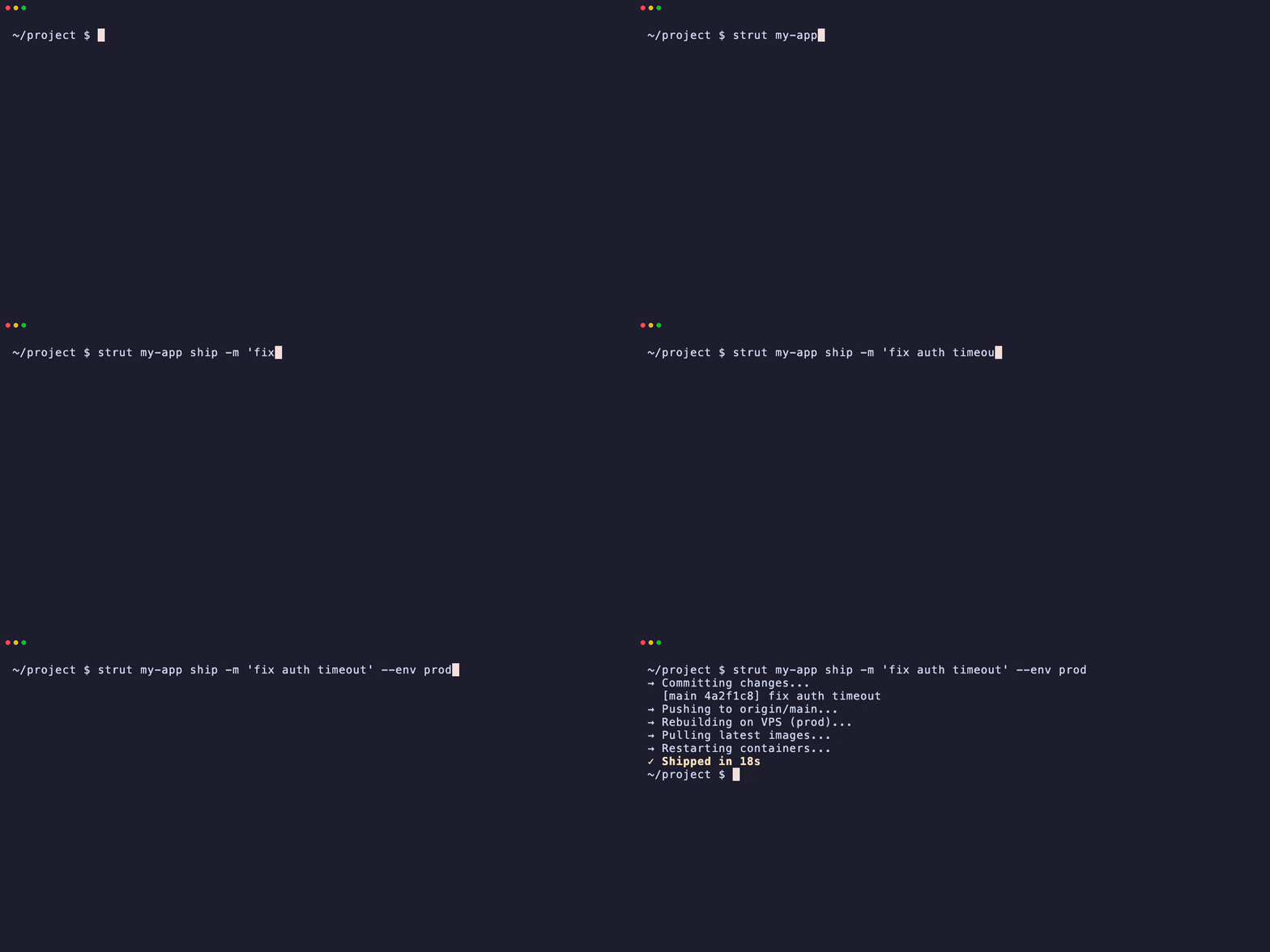
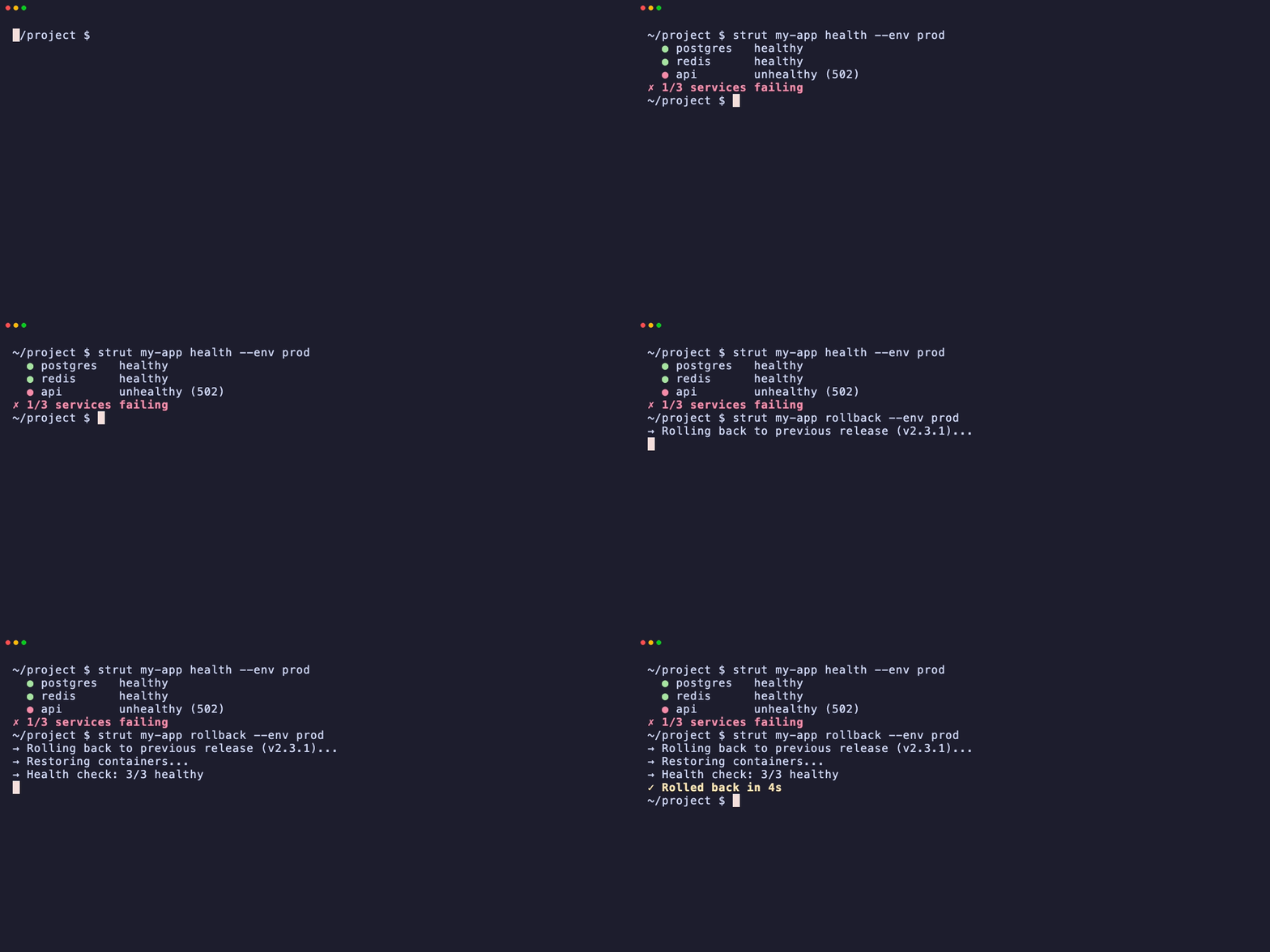
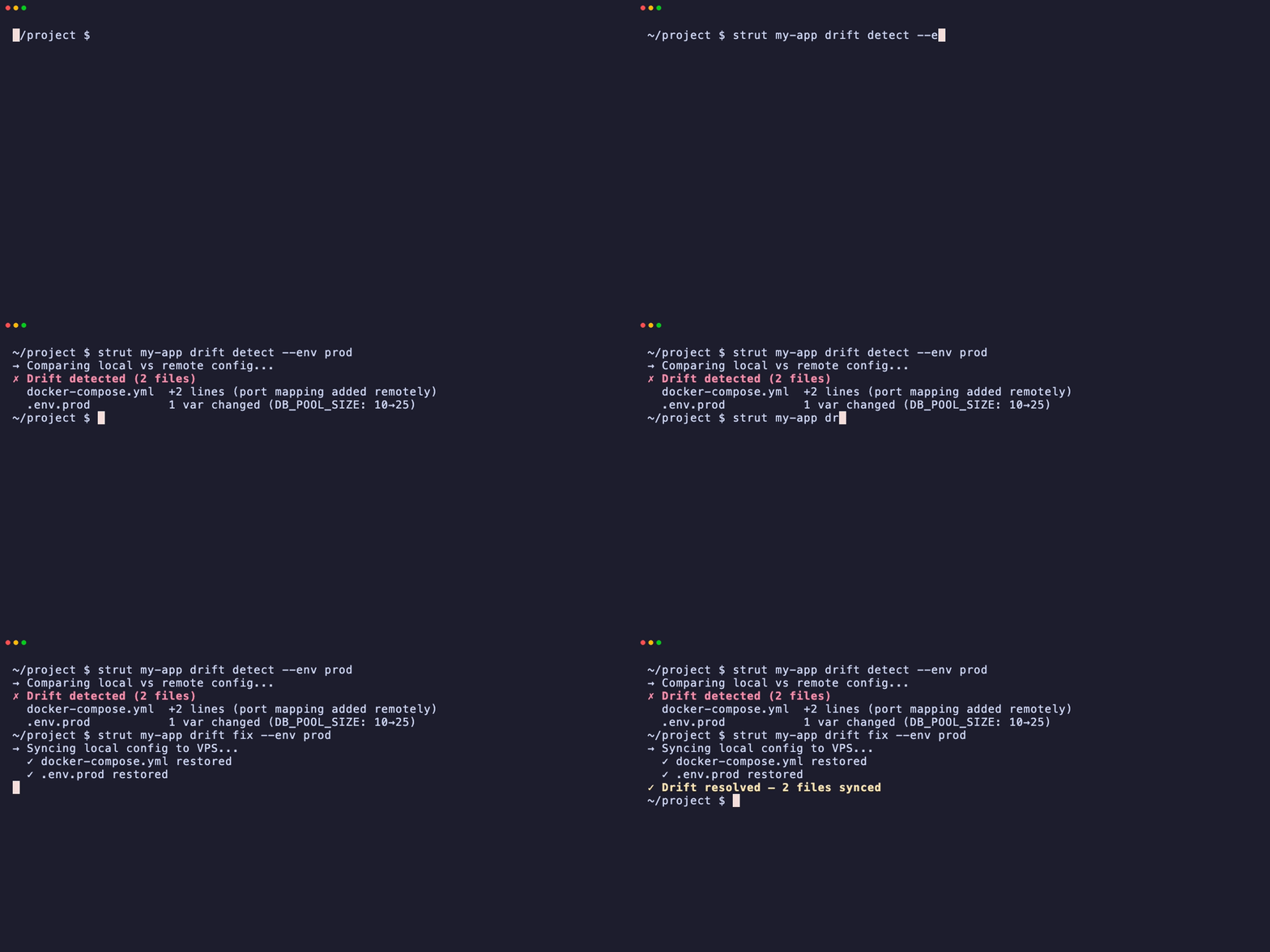

More demos — including recordings against a real DigitalOcean droplet — on the website.
strut <stack> <command> [--env <env>] [options]
| Command | Description |
|---|---|
release |
Full VPS release (update + migrate + deploy + verify) |
deploy |
Deploy stack containers |
stop |
Stop running containers |
destroy |
Permanently tear down a stack — fires pre_destroy/post_destroy hooks and clears the first-run marker |
health |
Run health checks |
briefing |
One-call situation report — posture + prioritized actions across every read-only check |
preflight |
Deploy go/no-go verdict (GO / CAUTION / NO-GO) with reasons |
logs |
View service logs |
backup / restore |
Database backup and restore |
db:pull / db:push |
Sync databases between VPS and local |
drift |
Configuration drift detection and auto-fix |
keys |
Key and credential management |
domain |
Configure domain and SSL certificates |
shell / exec |
SSH access to VPS |
rebuild |
Build images locally (or remotely via ship) and redeploy — supports --platform for cross-arch/multi-arch buildx builds |
ship |
Commit, push, and remote rebuild in one step |
remote:init |
Bootstrap strut on a remote VPS |
local |
Local development environment |
debug |
Container debugging tools |
fleet |
Multi-host status and sync |
dashboard |
Read-only HTTP fleet status page (HTML + JSON) |
mcp |
Expose strut as an MCP server for AI agents |
webhook |
Push-to-deploy via polling or an HTTP receiver |
list / scaffold / init |
Stack and project management |
See CLI Reference for the complete command list with flags and examples.
strut my-app release --env prod                              # Production release
strut my-app health --env prod --json                        # Health checks
strut my-app briefing --env prod                              # One-call situation report (posture + actions)
strut my-app preflight --env prod                             # Deploy go/no-go verdict before releasing
strut my-app logs api --follow --env prod                    # Follow logs
strut my-app backup postgres --env prod                      # Backup database
strut my-app restore backups/postgres-20260701.sql --env prod --dry-run  # Rehearse a restore
strut my-app db:pull --env prod                               # Pull DB locally
strut my-app drift images --env prod                          # Check for stale image digests
strut my-app keys db:rotate postgres --env prod               # Rotate credentials
strut my-app domain api.example.com admin@example.com --env prod  # SSL setup
strut fleet status                                             # Git sync state across all hosts
strut dashboard --port 8484 # Read-only HTTP fleet status page- Two-tree architecture — engine at
~/.strut/, your config at project root (Architecture) - Config-driven — no hardcoded service names, ports, or orgs in the engine (Configuration)
releasevsdeploy—releaseruns on VPS via SSH,deployruns locally--env prodreads.prod.envfor secrets and VPS connection info- Per-stack env isolation —
.prod.envis shared by every stack deployed with--env prodon a host. If it setsCOMPOSE_PROJECT_NAME, all those stacks resolve to the same Compose project, so a deploy's orphan cleanup can delete a sibling stack's containers. To isolate a stack, give it its own env file (.<stack>-prod.env) and deploy with--env <stack>-prod; runstrut postureto catch this footgun before it bites --dry-runpreviews destructive operations without executing- Dynamic health checks driven by
services.conf - Multi-arch / ARM builds —
strut <stack> rebuild --platform linux/arm64,linux/amd64(or aPLATFORMSvar inservices.conf) builds viadocker buildxand pushes a multi-arch manifest, so an image built on an amd64 laptop doesn't fail withexec format erroron a Raspberry Pi. A single platform that differs from the host's builds via buildx--load; unsetPLATFORMSkeeps the plaindocker compose buildpath (no buildx dependency). strut also warns before a build if the target host's declared architecture (arch=instrut.conf's[hosts], or a best-effort SSH probe) isn't among the platforms being built.
| Topic | Description |
|---|---|
| Installation | Install, upgrade, uninstall |
| Quick Start | First project walkthrough |
| Architecture | How strut works under the hood |
| Configuration | strut.conf, env files, per-stack config |
| CLI Reference | Full command reference |
| Deployment | Deploy, release, stop workflows |
| Blue-Green Deploy | Zero-downtime dual-project deploys |
| Database Backups | Backup, restore, restore rehearsal, pull, push |
| Key Rotation | SSH, API, DB, GitHub credential rotation |
| Drift Detection | Detect and fix config and image-digest drift |
| Domain and SSL | Custom domains, Let's Encrypt, auto-provisioning |
| Multi-Host Topology | Map stacks to hosts, fleet status |
| MCP Server | Expose strut operations as MCP tools |
| Webhook Automation | Push-to-deploy via poll or receiver |
| Monitoring | Prometheus, Grafana, Alertmanager |
| Volume Management | Dynamic volume management |
| VPS Audit & Migration | Audit and migrate existing setups |
| Stack Validation | Validate stack integrity |
| Debugging | Troubleshoot production issues |
| Local Development | Local stack management |
| Contributing | Setup, testing, linting |
| Code Conventions | Shell module standards |
| Adding a New Command | Extending the CLI |
| Project Structure | File layout and module map |
Deploy a strut-managed stack from GitHub Actions in one step:
- uses: actions/checkout@v4

- uses: gfargo/strut-action@v1
  with:
    stack: my-app
    command: release          # release | ship (see security note in wiki)
    env: prod
    host: ${{ secrets.STRUT_HOST }}
    ssh-key: ${{ secrets.STRUT_SSH_KEY }}
The action installs a pinned strut, writes the SSH key to a 600-permissions file, materializes the env file from inputs/secrets, and runs the requested command. SSH key and env values are never echoed to logs.
See GitHub Action for the full input reference, pinning instructions, and examples. A starter workflow is available in templates/.github/workflows/strut-deploy.yml.
Project paths must not contain spaces. strut's compose and SSH command
builders use word-split path expansion internally, so a project root like
/Users/me/My Projects/infra is rejected up front with a clear error rather
than failing confusingly deep in the pipeline.
Workarounds:
- Create a space-free symlink:
ln -s "/path/with spaces/infra" ~/strut-project - Or set
STRUT_PROJECTto the symlink:STRUT_PROJECT=~/strut-project strut <stack> <cmd>
bats tests/                    # Run all tests
bats tests/test_config.bats    # Run specific file
See Contributing for the full development setup.
Issues and PRs welcome — see Contributing and Code Conventions for setup, testing, and shell style guidelines.
MIT — see LICENSE.