


To run the example project; clone the repo, and run pod install from the Example directory first.
To use it in your view controller, with styles and buttons:
// set appearance style
[[MMPopLabel appearance] setLabelColor:[UIColor blueColor]];
[[MMPopLabel appearance] setLabelTextColor:[UIColor whiteColor]];
[[MMPopLabel appearance] setLabelTextHighlightColor:[UIColor greenColor]];
[[MMPopLabel appearance] setLabelFont:[UIFont fontWithName:@"HelveticaNeue-Light" size:12.0f]];
[[MMPopLabel appearance] setButtonFont:[UIFont fontWithName:@"HelveticaNeue" size:12.0f]];

// _label is a view controller property
_label = [MMPopLabel popLabelWithText:
          @"Lorem Ipsum is simply dummy text of the printing and typesetting industry. "
          "Lorem Ipsum has been the industry's standard dummy text ever since the 1500s."];

// add a couple of buttons
UIButton *skipButton = [[UIButton alloc] initWithFrame:CGRectZero];
[skipButton setTitle:NSLocalizedString(@"Skip Tutorial", @"Skip Tutorial Button") forState:UIControlStateNormal];
[_label addButton:skipButton];

UIButton *okButton = [[UIButton alloc] initWithFrame:CGRectZero];
[okButton setTitle:NSLocalizedString(@"OK, Got It!", @"Dismiss Button") forState:UIControlStateNormal];
[_label addButton:okButton];

// add it to your view
[self.view addSubview:_label];
To show the label, just add this code to a button action or some other type of event, passing in the view you wish to point to:
- (IBAction)showLabel:(id)sender
{
	UIView *view = (UIView *)sender;
	[_label popAtView:view];
}
MMPopLabel now also supports UIBarButtonItem:
- (IBAction)showLabel:(id)sender
{
	UIBarButtonItem *barButtonItem = (UIBarButtonItem *)sender;
	[_label popAtBarButtonItem:barButtonItem];
}
To receive the label events, just set your view controller as it's delegate and implement the MMPopLabelDelegate protocol:
- (void)dismissedPopLabel:(MMPopLabel *)popLabel;
- (void)didPressButtonForPopLabel:(MMPopLabel *)popLabel atIndex:(NSInteger)index;
To disable animations, use of the following option when setting up your label:
_label = [MMPopLabel popLabelWithText:
          @"Lorem Ipsum is simply dummy text of the printing and typesetting industry. "
          "Lorem Ipsum has been the industry's standard dummy text ever since the 1500s." options:MMPopLabelAnimationOptionDontPop];
Check the MMPopLabelAnimationOptions enumeration for more options.
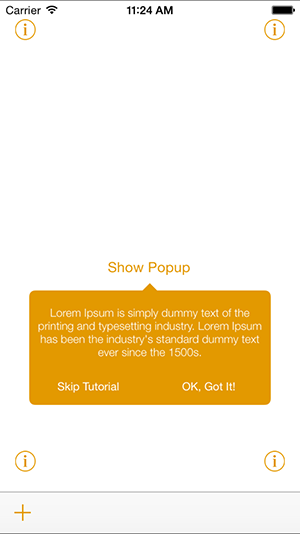
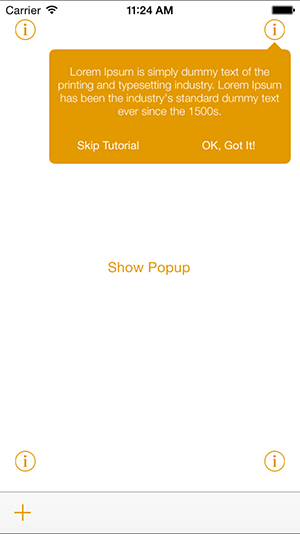
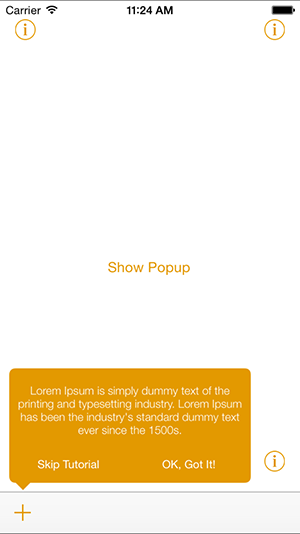
- iOS 7.0+ and XCode 5.1+
MMPopLabel is available through CocoaPods. To install it, simply add the following line to your Podfile:
pod "MMPopLabel"
mgcm, miltonmoura@gmail.com
MMPopLabel is available under the MIT license. See the LICENSE file for more info.